AGENTWALLETS · INDEPENDENT PERSPECTIVES
Squads: Spending Limits for Solana Automation
Design a scoped Solana treasury allowance with Squads: vault, token, member, destination, reset period and configuration authority, plus revocation tests.
Quick answer
Squads spending limits let authorized members move a bounded amount of a selected token without full Squad approval for each transfer. The allowance is separate from the treasury balance. Teams must verify the vault, members, destinations, reset behavior and who can change the configuration, especially with a Controlled Multisig.
Suppose a team keeps 20,000 USDC in a Solana treasury but wants a maintenance bot to pay one approved service address from a 100-USDC allowance. Giving the bot access to the entire treasury would exceed its job. Asking all signers to approve every small transfer might also make the routine impractical.
Squads spending limits provide a way to separate the large balance from a smaller spending permission. This example assumes the selected USDC mint and a supported Solana environment; 100 USDC is an invented budget, not a product limit, and transaction costs are separate. We have not created a Squad or moved funds for this article.
Describe the allowance before writing the bot
The spending-limit guide identifies the source account, token, amount, period and destinations. Members can use an established limit without obtaining full Squad approval for every withdrawal. A limit selects one token; a configured period can reset the amount, while None allows use until the total is consumed.
Our first decision is therefore whether “100” means a lifetime allowance for this task or a repeating operating budget. For a one-off migration, a non-resetting allowance may better express the intention. For ongoing maintenance, the team might choose a supported recurring period after checking its exact reset behavior.
Do not assume “100 per period” also means “only one payment.” If the bot makes five 20-USDC transfers within the same allowance, the business must still associate them with five legitimate service invoices. An amount ceiling limits exposure; it does not decide whether an invoice is genuine or whether the service was delivered.
| Example setting | What the team intends | Mistake to avoid |
|---|---|---|
| Treasury vault | One specified source of funds | Selecting another vault with similar labeling |
| Token mint | The intended USDC asset | Treating all displayed dollar tokens as interchangeable |
| Member | The designated bot identity | Accidentally applying the allowance to a broader member set |
| Destination | The approved service address | Leaving recipient scope broader than the task requires |
| Period | One-off or deliberately recurring | Assuming an allowance never resets when it does |
The authority that sets limits matters as much as the limit
Squads’ account reference distinguishes configuration, proposals and vault transactions. In an autonomous multisig, configuration changes use the members’ governance process. A Controlled Multisig instead has a configured authority for configuration changes.
The Controlled Multisig explanation warns that this authority can change configuration outside member consensus. If the maintenance bot also holds that authority, the apparent 100-USDC boundary may not represent the operational protection the team expects. Someone able to rewrite the rules has a different kind of power from someone allowed to spend under them.
There is a specific add-spending-limit instruction for Controlled Multisigs. Do not copy it into an autonomous-multisig integration and assume it follows the normal approval process. Its member-selection and vault parameters deserve explicit review. Pin the SDK/program context and use the configuration path that actually matches the account.
From an approved budget to one transfer
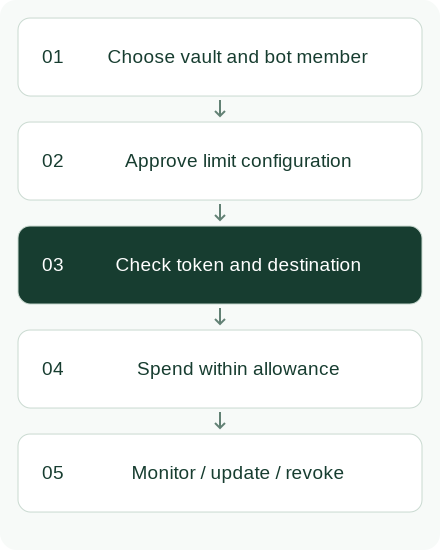
For the teaching example, the team first confirms the source vault and the bot member. It then establishes the intended allowance through the account’s correct configuration process. The bot’s payment code should retrieve the effective allowance before attempting a transfer and compare the intended token, destination and remaining amount.
That preflight improves the user experience, but the authoritative execution result still matters. Two bot jobs might both see enough remaining allowance before either transaction completes. The application should serialize its own business decisions where appropriate, then read the actual transaction outcome and remaining limit rather than assume both requests succeeded.
Keep invoice identity separate from the on-chain transaction. A scheduler restarting after a crash should recover whether invoice M-18 was paid before issuing another transfer. Squads is managing account authority; it does not automatically know that two different calls represent the same supplier invoice.
Revoking access is an operational procedure
Suppose the service provider changes its receiving address. Treat this as a new destination approval, not a harmless text update suggested by the bot. Record who verified the new address and update the appropriate configuration before resuming payments.
If the bot is retired or its credentials are suspected to be compromised, review the active spending limit and membership together. The official guide recommends keeping limits aligned with personnel changes. Do not assume deleting a local API key revokes an on-chain allowance or that a configuration change reverses a transfer already executed.
A practical drill is to disable the intended spending path, then attempt another transfer using the old bot identity in a safe test environment. Also attempt an unsupported destination, an over-limit amount and a transfer around a period reset. These are proposed tests; their outcomes need to be observed on the actual deployment.
Scope and cost checks before production
A spending limit is a scoped transfer mechanism, not a universal firewall for arbitrary Solana program interactions. If the bot also has another route to propose, approve or execute transactions, analyze that route separately. The team’s real exposure is the combined authority available to the identity.
The Squads cost guide distinguishes network operations, account-related costs and platform offerings. Obtain current estimates for creating the account, creating or changing limits and executing transfers. A USDC allowance is not a guarantee that the transaction fee payer has sufficient SOL. No price from the guide is treated here as a live quote.
Use the Squads profile to keep the source trail. Safe’s analysis explains a different EVM account/module model; do not translate its controls word for word into Solana. For this bot, the completion criterion is concrete: the approved identity can pay the approved destination within the intended allowance, and loses that ability when the team revokes the relevant authority.
FOLLOW THE SOURCES